Thursday, October 14, 2010

Top10 Tips To Keep Your System Faster

Top10 Tips To Keep Your System Faster

Follow these tips and you will definitely have a much faster and more reliable PC!
 1. Wallpapers[Image]: They slow your whole system down, so if you're willing to compromise, have a basic plain one instead!
2. Drivers: Update your hardware drivers as frequently as possible.  New drivers tend to increase system speed especially in the case of graphics cards, their drivers are updated by the manufacturer very frequently!
3. Minimizing: If you want to use several programs at the same time then minimize those you are not using.  This helps reduce the overload on RAM[Image].
4. Boot Faster: The 'starting Windows 98/XP' message on startup can delay your booting for a couple of seconds.  To get rid of this message go to c:\ and find the file Msdos.sys.  Remove the Read-Only option.  Next, open it in Notepad or any other text editor.  Finally, go to the text 'Options' within the file and make the following changes: Add BootDelay=0.  To make your booting even faster, set add Logo=0 to remove the Windows logo at startup.
5. Restart only Windows: When restarting your PC, hold down Shift to only restart Windows rather than the whole system which will only take a fraction of the time.
6. Turn Off Animations:  Go to Display Settings from the Control Panel and switch to the Effects Tab. Now turn off Show Windows Content While Dragging and Smooth Edges on Screen Fonts.  This tip is also helpful with Windows XP because of the various fade/scroll effects.
7. Faster Start-Menu Access: Go to the Start menu and select Run.  Now type Regedit and hit Enter.  The Registry Editor will appear on the screen.  Now, open the folder HKEY_CURRENT_USER\Control Panel\Desktop.  You should see a MenuShowDelay value.  If you don't then do the following: right click on a blank space in the right pane and select New\String.  Change the name in the new value to MenuShowDelay.  Now that we have the MenuShowDelay value, double click on it and enter 0 in the value data field.  This sets the start menu delay to 0 milliseconds.
8. Resolutions: If you are willing to do anything for faster performance from your PC, then try lowering your display resolution.  The lower it is, the faster your PC.
9. Turn off Active Desktop:  Go to your Display Properties and switch to the Web tab.  Uncheck View My Active Desktop As a Web Page.  Since the Active Desktop option under Windows 98 uses a lot of system resources, this option can have a dramatic effect on the speed of the whole system.
10. Defragment Often:  Windows 98's Defrag tool uses Application Acceleration from Intel which means that when you defragment your drive, data is physically arranged on the drive so that applications will load faster.

Tuesday, October 12, 2010

ATM hacking tricks

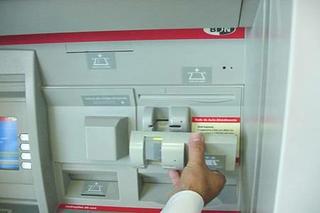
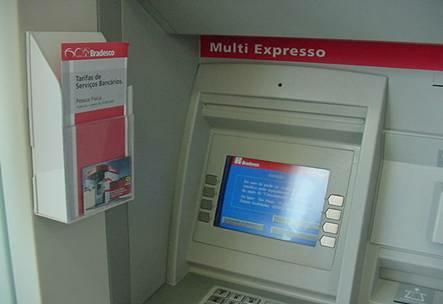
The equipment used to capture your ATM card number and PIN are cleverly disguised to look like normal ATM equipment. A “skimmer” is mounted to the front of the normal ATM card slot that reads the ATM card number and transmits it to the criminals sitting in a nearby car. At the same time, a wireless camera is disguised to look like a leaflet holder and is mounted in a position to view ATM PIN entries.
The thieves copy the cards and use the PIN numbers to withdraw thousands from many accounts in a very short time directly from the bank ATM.”
This activity has been around for a few years. In the past, it was primarily done in small retailers, where the skimming device was behind the counter and the camera was over the keypad. It was also done by setting up ATM machines that were completely fake. It’s always a GOOD IDEA to conceal your actions when entering your PIN. When you do this, the camera doesn’t record your PIN number and they can’t clone your card.
Here is a picture of a ATM Machine after being compromised.

They attach a device over the card slot on the legitimate ATM, which reads the magnetic information. Using the latest wireless technology, it is normally transmitted to fraudsters in a nearby vehicle.


Your ATM is protected by a PIN, but these criminals have a solution for this too. They install a hidden camera, again using the latest technology (wireless) and the PIN is digitally recorded.


Here is a picture of the compromised ATM with the camera installed.


Whenever you find such frauds contact your nearest bank or dial toll free no. of any bank.

Note: This Information is for only study purpose only..
Do not apply practically,its illegal...(HAcker's Arena).

How to hack a IPhone latest by hacker's arena....

http://www.youtube.com/watch?v=O8glC1bJut4
View this video an get a detail information to hack a Iphone.
If you had problems jailbreaking your iPhone 3GS, iPhone 4, iPad, iPod Touch 3G and the new iPod Touch 4G using limera1n then try it again using the latest version of limera1n as many readers have reported that the new version has fixed the problems they were facing with the previous version (especially iPad users).
This video will help you to get the exact solution for this problem.

http://www.youtube.com/watch?v=pguHOBWqrWQ
Another interesting video clip to jailbreaking your iPhone 3GS, iPhone 4, iPad, iPod Touch 3G and the new iPod Touch 4G.

Monday, October 11, 2010

HAcking is not a cirme its an art....

Computer hackers are employed by many companies to get complete access on the computer so that they can delete, edit, copy any file or install as their technical staff. These hackers use their skills to find faults in company’s security system so that it can be repaired quickly. Sometimes hacking also prevents serious identity related crimes.